Time-to-Fill Cost Calculator
Put a number on the cost of leaving a role open. Enter each role’s salary, the value it produces, and the days it has been open, and the workbook returns the net cost of the vacancy, the cost across every open role, and what hiring faster would save.
One-time purchase, no subscription. Instant download.
Built to the TrueStep HR standard
- The net cost of every open role: each vacancy’s value lost while the seat is empty, minus the pay and benefits you are not spending, plus any coverage cost, so the figure is honest rather than inflated
- One assumption you control: a value multiplier per role sets how much output it produces against its pay, so a revenue role and a support role are not treated as costing the same to leave open
- The net cost per day: the daily burn across all your open roles, the lever faster hiring pulls, plus an estimate of what cutting a set number of days from each role would save
- Sourced benchmarks built in: SHRM’s time-to-fill figure and the common cost-of-vacancy range, so your result has something to sit against
- Open, editable formulas in Excel or Google Sheets, with a worked example pre-filled and a one-page summary that totals every open role for a board-ready view
The workbook computes from the numbers you enter. Your open roles, their salaries, the value multipliers, the days open, and any coverage cost are yours to set.
14-day money-back guarantee. If it does not help, email us and we refund you.
The value of a role is a judgment call set by the multiplier, so treat the result as a conservative floor for sizing the cost of open roles, not a precise figure.
Not the right fit? Take the 60-second match.
One Excel workbook that prices every open role and totals the cost
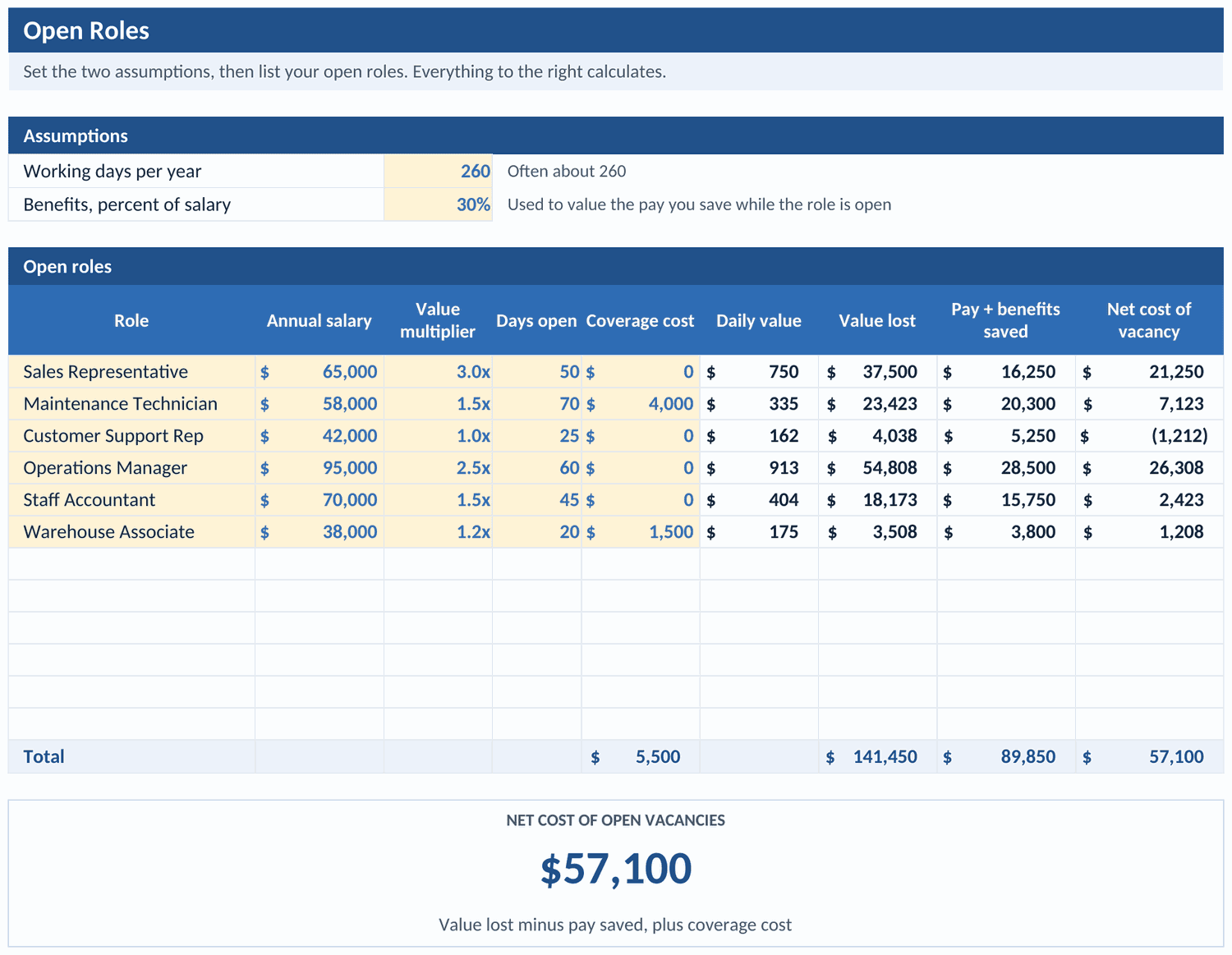
A working model, not a blank grid. You set two assumptions and list your open roles, the workbook returns the net cost of each vacancy and the total, and it opens on a worked example so the logic is clear before you change anything.
Time-to-Fill Cost Calculator
Set working days per year and benefits as a percent of salary, then list each open role with its salary, a value multiplier, the days open, and any coverage cost. The workbook returns the role’s daily value, the value lost while it is empty, the loaded pay you are not spending, and the net cost of the vacancy, role by role with a running total.
A board-ready summary, sourced benchmarks, and the method in plain English
A one-page Summary totals every open role, shows the average days open and the net cost per day, and estimates what cutting your time to fill would save. A Benchmark tab holds time-to-fill and cost-of-vacancy figures from SHRM and public research, and the Notes tab documents how each number is built.
Three steps from open roles to the cost of waiting
You set two assumptions, list the roles, and the workbook returns the net cost of each vacancy, the total, and what faster hiring would save.
Set the two assumptions
Fill the amber cells for working days per year and benefits as a percent of salary. Both feed the pay-saved side of every role, so the cost you see is net of the salary you are not spending while the seat is empty.
List your open roles
Enter each role’s title, annual salary, a value multiplier, the days it has been open, and any coverage cost you are paying. The daily value, the value lost, the pay saved, and the net cost of the vacancy calculate on the right.
Read the net cost and the lever
The Summary totals every open role and shows the net cost per day, the amount each day of faster hiring saves across all of them. Set how many days you could cut to see the payback of moving sooner.
A vacancy is not free and it is not the whole salary either
Two shortcuts get this wrong. One treats an open role as costing nothing because no one is being paid. The other counts the full salary as lost. The honest number sits between them: the value the role would have produced, minus the pay you are not spending while it is empty.
Who this calculator fits and where to go if that is not you
It prices the roles that are open now and the payback of filling them faster. For the cost of the departure itself or the team that fills the roles, the right tool is next to it.
Built for
- A talent acquisition or HR leader who needs to put a defensible number on open roles and the cost of a slow process, role by role.
- A finance or HR partner weighing the payback of hiring faster, or of the coverage and overtime a long vacancy runs up.
- A hiring manager or operator who wants to show what an unfilled seat is costing rather than argue it in the abstract.
If you are looking for
- How many recruiters it takes to fill your open roles faster, sized against the reqs they carry. The Recruiter Capacity Planner runs that.
- Whether to fill faster with an outside agency or your own recruiters, fee by fee. The Agency vs Internal Recruiter ROI Calculator runs that decision.
Before you buy
What format is it and can I edit it?
What does the paid workbook do that a free calculator does not?
How accurate is the result?
How do I set the value multiplier?
What is the refund policy?
What happens after I buy?
Can I expense this purchase to my business?
Most customers buy TrueStep HR tools for business use, and a tool you use for work often qualifies as a deductible business expense. Whether it does for you depends on your situation, so confirm with your accountant or tax professional. Your receipt arrives by email at checkout and works as documentation.
The 6 red flags to check before you discipline or fire someone
A five-minute screen to run before you act. Free PDF, sent to your inbox. Unsubscribe anytime.
This tool is built on published method and current rules. Read the basis yourself:
What buyers say
Put a number on every open role
The net cost of each vacancy, the cost across all of them, and what hiring faster would save, in a file you keep.